Concurrent User Log
This menu functions to display the log of logged in and logged out users in the system by displaying IP (Internet Protocol) used by the users. To access this menu, click Setting > System Setting > System Log > Concurrent User Log.
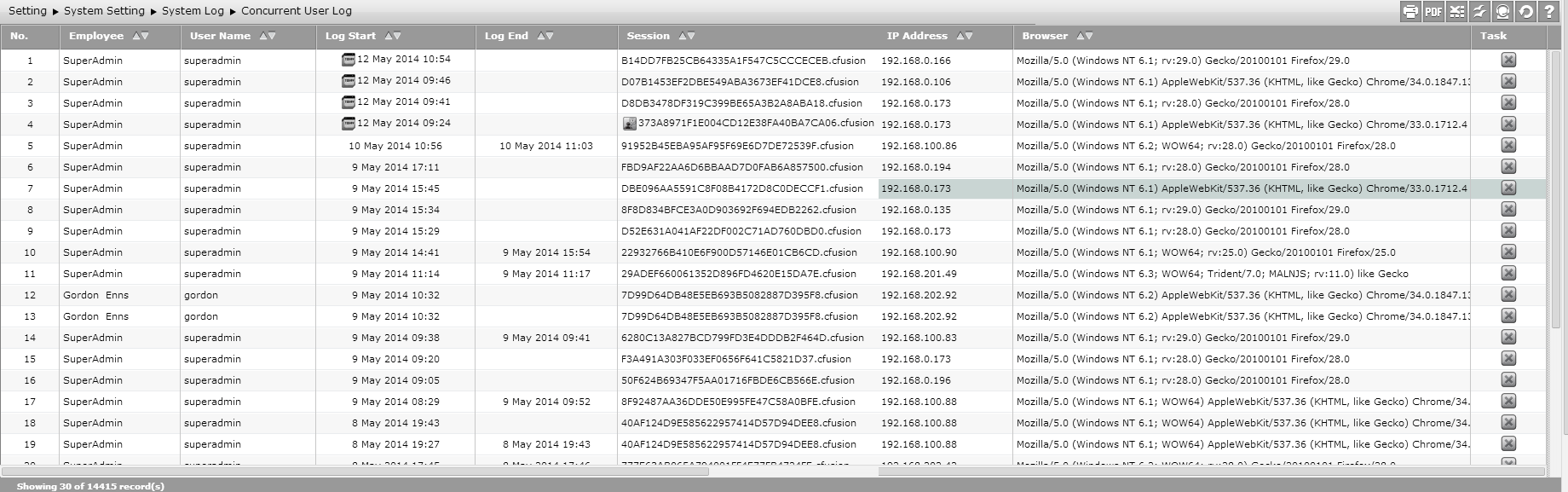
This page displays the following information.
- Employee
It displays name of employee enroled and entered in the system. Users can check all users enroled in the system in Setting > System Setting > Access Management > User Management.
- User Name
It displays the username used by employee to log in the system. Users can check all users enroled in the system in Setting > System Setting > Access Management > User Management.
- Log Start
It displays date and time when users log in to the system. icon only appears when users log in to the system at the current date.
- Log End
It displays date and time when users log out from the system. If users have not logged out from the system, then the log end date and time will not be recorded.
- Session
It is the unique code acquired by users every time users log in to the system. icon indicates that the logged in users are active at the current time in that session.
- IP Address
It is IP used by users to log in to the system.
- Browser
It is the browser type used by users to access SunFish application.
- Task
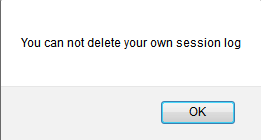
There is Terminate Session icon in this column. Click to stop user's activity. Terminate Session can only delete session of other users which are inactive users in that session. When users do Terminate Session for the themselves, then users will get a notification as shown below.
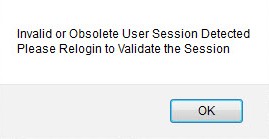
For example, when users log in to the system as SuperAdmin, then users can stop the activities of other users except SuperAdmin. Then the other users will be directed to login page to re-log in the system and get a notification as shown below.
After users click for other users, then that users' log in to the index page of Concurrent User Log will disappear.